Free Sample lessons
Are you curious about the Mech Materials Course, but uncertain it it's for you? Simply enroll in these free lessons, to see if you like it.
What's it about?
After you finish sculpting, or modeling something with booleans, it's fun to make a nice render of your model with materials.
Normally you need to first retopologize, then UV unwrap... many hours, or even days of work before you can see your render. Often, we feel it's not worth the effort and move on.
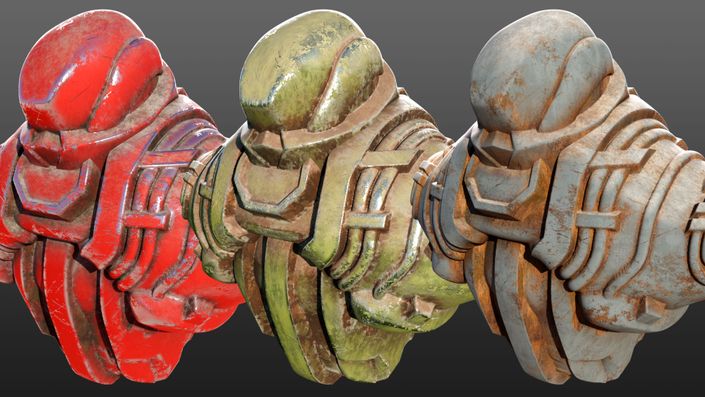
That's where these drag and drop materials come in. You just drop them on your model, and you're done. Don't worry about UV unwrapping or retopology for now. Just make a cool render! (note, the drag and drop material assets are not included in the free sample).
Free Sample Curriculum
What's in the full video course?
Besides the materials, you'll also receive 4 hours of video tutorials, detailing how to make these kinds of drag and drop materials.
The video course describes how to create various procedural masks, as well as damage textures like scratch maps and worn surfaces. It also looks at how to leverage Photogrammetry, how to extract albedo textures and how to make it all tile seamlessly without visible repetition.
Finally, we go over the entire process of creating a drag and drop worn metal material from start to finish.
Get ready for awesome renders!
Made for Cycles
Please note, that these materials use procedural Cycles shader nodes for the edge wear effects, that are not available in the Eevee render engine. So these materials work best in Cycles.
However, you can bake the textures in Cycles, and then use them in Eevee (or in a game engine). If you want to do that, you will need a UV-unwrapped version of your model.


Procedural masks
Using both procedural masks and textures from photograps, we get the best of both worlds. In the course we create several masks, that we then turn into user-friendly node groups. The node groups are also included in the asset bundle.

Photo textures
Besides the ready to use materials, you'll get all of the photographic textures I've collected myself. I've already made seamlessly tiling versions as well. I've also extracted Normal maps from them, that you can use as surface damage maps.

Colors
You can't always find a photographic texture in the exact color you need. To overcome this obstacle, we look at how to create good looking color maps in any hue we want, and how to choose nice hues that are used in the real world.